Below are some of our frequently asked Stellic questions for students. If your question isn't answered below, please contact us at unkstellic@unk.edu
Stellic is a dynamic advising support platform that empowers students as they navigate their program of study at UNK. Stellic offers comprehensive course planning and communication tools, enabling students to explore academic options, manage requirements, and connect with advisors and support systems.
Stellic also enhances the advising experience for advisors with tools that help advisors keep track of their students’ plans and progress, and features that promote engagement between students, advisors, and faculty.
Stellic serves all students, as well as faculty and staff who serve advising roles across the University. As a holistic advising support platform, Stellic is an essential tool for every individual who plays a role in guiding UNK students on their path to success.
Students benefit from enhanced course planning tools that help them explore majors and minors, discover new classes, and design potential paths for future semesters. Students are able to connect with advisors across the University, send and receive messages, build a schedule that meet their preferences and register for upcoming semesters.
Advisors are able to review students’ academic plans, communicate with students, and create custom reports-- all within one platform.
Training and support for students is offered as they gain access to Stellic. Training will be offered both in-person and online resources will be housed within the Stellic For Students page. Staff is available via email for ongoing support.
Yes. Stellic is not a replacement for MyBLUE. MyBLUE performs a variety of functions and contains types of information that Stellic does not.
Yes, Students can register for courses in Stellic. For guidance on this process refer to Stellic for Advisors & Stellic for Students for step by step directions and video tutorials.
Students can also continue to register for classes in MyBLUE until notified otherwise.
Students will receive emails from the Office of the University Registrar as the platform becomes available to them. They will not need to take any special action to gain access. The project team will provide online guides and email support. Please contact us at unkstellic@unk.edu with any questions.
Stellic updates from MyBLUE overnight. It may take up to 24 hours for changes to display in Stellic.
Nightly updates include: Transfer credit being loaded, Advisor changes, student demographic changes, general platform updates
Instant updates include: Program changes once processed by the Registrar's office, course substitutions or exceptions when approved, hold messages.
Students that have graduated will be designated as "certified" and remain in that status for 2 years until they are archived in Stellic.
Student's that are not currently enrolled in any coursework remain active for 2 years until they are discontinued in MyBlue. After discontinuation their Stellic student profile will be archived.
If a student submitted a chosen name in MyBlue, Stellic will use chosen name. If not, Stellic uses the student’s legal name.
Yes, students are able to send messages directly to their advisors through Stellic. Likewise, advisors can message students individually or through bulk messages. More about messaging feature and functions.
Once a student has completed a program or plan change form in MyBlue and the Registrar's office approves the request. The change will display in Stellic when the request has been processed.
To view the history of changes such as exceptions, program and plan changes click the clock icon in the top right of the student's profile page. You can view the history of actions made by advisors, students, registrar staff or data updates, on a student's plan.
A side-bar will appear to display actions taken on a student's plan. You can see actions to the entire plan, or actions done *to* a certain semester, using the drop-down menu at the top as well as who made the changes and when.
There is no section grouping of unrestricted electives. Courses that are not being applied to a major or minor, but are being applied to other requirements such as the institutional requirements can be viewed from the 120 Overall Hours Required Section.
The 120 Overall Hour Required section includes all courses a student has completed, is currently enrolled in and registered for in the next term. Transfer courses and unrestricted electives are also placed here. Courses that are being used to fulfill more than one program requirement are indicated with a double checkmark icon. Courses without that icon are designated as unrestricted electives. See progress icons definitions and how they are used to fulfill program requirements.
Incomplete grades appear within the requirement for which they will count once completed. An easy way to catch these is to scan the student’s course history in the Courses tab to look for any Incomplete. Or scan the degree audit and look for courses graded with an I.
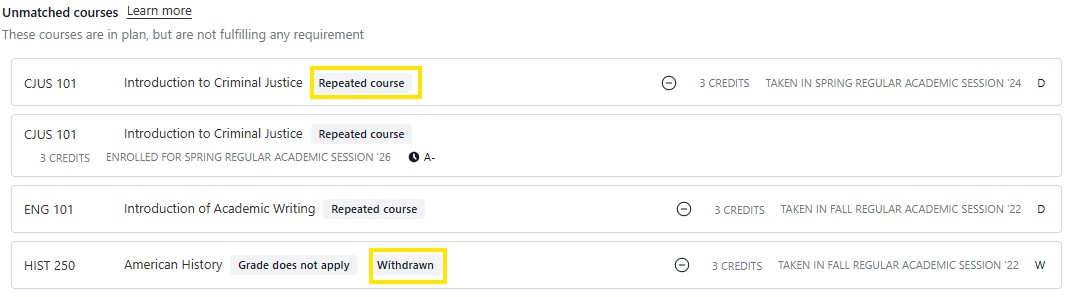
The unmatched courses are grouped at the very bottom of the degree audit. Unmatched courses are taken or completed courses that do not fulfill any requirements. Typically unmatched courses include courses where a student failed or withdrew or repeated and the second attempt was completed with a higher grade. In rare circumstances, if a student has completed a course more times than allowed, Stellic will place those credits in the unmatched course section. Approval from the Registrar's office is needed to make that specific exception.
If you are thinking of adding a major, minor or completely changing your program you can "try on" a program and apply your current degree audit to view which courses and requirements have been satisfied and to see what are the remaining courses and requirements.
To do this Click on Programs on the left menu bar of your screen and Search for a major or minor. Open the major or minor. Under the About tab, your degree audit will display with your current program first and below that will be the Major or Minor you evaluating. The Pathway tab at the top of your page will allow you to review courses and apply the Pathway to your Student Plan.
To officially change your program, you will still need to complete the Program Change form in MyBLue.