

Exceptions allow Stellic administrators (advisors, department chairs, registrar staff) to make requests and approvals that can modify student audit requirements for individual circumstances. Information and guidelines on how exceptions are processed from requests to approval are found here.
Quick link training topics:
Course Substitutions allow for a different course to satisfy a requirement. This option will add a course that could count for the requirement to the list of eligible courses (for this student only). Course substitutions are commonly used to resolve course duplication issues. If a department chair wants to make a substitution for all students in a particular program, they should contact the Office of the University Registrar to discuss “blanket memos.”
Exclude Courses allows you to select courses that cannot count for the requirement. This means that even if the courses would typically count toward the requirement's constraints, the course will no longer be allowed to fulfill the requirement.
Move Excess Credits allows you to move a part of a course to another requirement. (Not available at the course level.) In other words, you can split the course into multiple pieces so that it can count for more than one requirement at a time. This is a complicated and rare exception, so please contact the Office of the University Registrar directly instead of requesting it through Stellic.
Waive or Modify Requirement Constraint allows you to change the constraints for the category. (Not available at the course level.) You can change a primary constraint or change or remove a secondary constraint.
Waive this Requirement will change the audit so that the student does not have to satisfy the requirement at all. If there are sub-categories in that category, they will also be waived.
Tip: If you waive the requirement, no specific course will show in the audit under this requirement. If the audit also has a unit total constraint, you may want to modify that constraint, since no units are counted under a waived requirement.
If you waive a course at the course level, it will waive the course and/or requirement that could use the course in any instance in the student's audit. We strongly recommend avoiding waiving individual courses unless you are certain there are no other instances where the course can be used anywhere else in the student's audit.
Advisors can now request exceptions in Stellic for students they have access to. Exceptions are directed to the appropriate department chair before final review by the Office of the University Registrar. Students are not able to request their own substitutions.
Please note, the General Education requirements (not required by the major) may not be substituted. For questions about the General Education program and requirements, please contact the Director of General Education.
When to submit an exception? Exception requests should not be made until a student has officially declared their program in MyBlue.
To initiate a exception/substitution request: Navigate to the student’s progress tab and locate the course/requirement you would like to substitute.
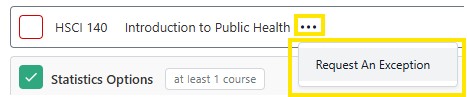
Click the 3 horizontal dots next to the title of the course/requirement and click “Request An Exception.”
All students will have the “Undergraduate Exception Request” workflow, and you will select this in most cases.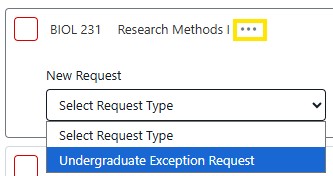
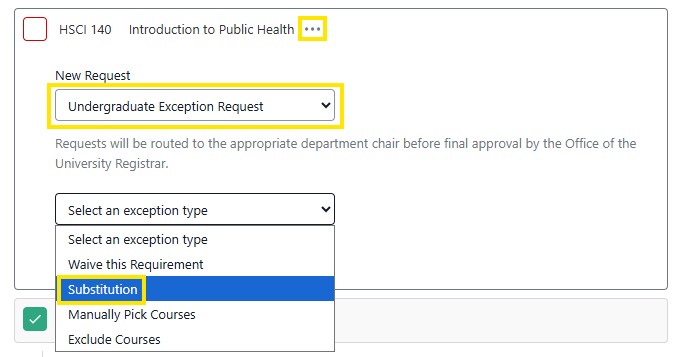
Select the type of exception you’re requesting (this will typically be a substitution).
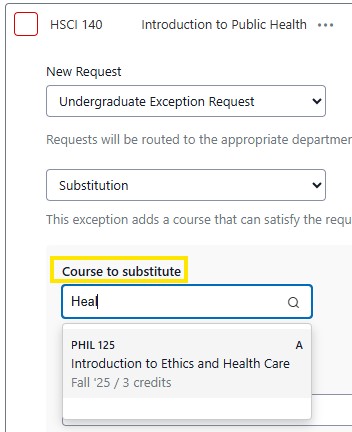
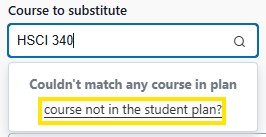
Note: If the student has not yet completed or registered for the course, click the “course not in the student plan?” option and search for the course in the new search that appears.
Add a justification for the request (this will be viewed by the appropriate department chair and Office of the University Registrar and will be displayed to the student) and click “Submit Request.” When asked if you are sure, click yes at the top of the screen.
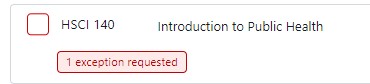
Once submitted, you will see on the requirement that an exception has been requested. If you would like to review the exception request, you can click on the red button, or on the student's profile, click on the Requests tab. The requests tab, will display the current status of the approval through the workflow.
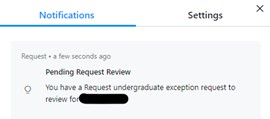
Next, Department chairs will receive an email and notification within Stellic alerting them that a request is pending.
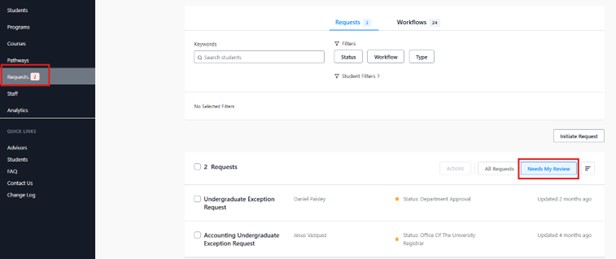
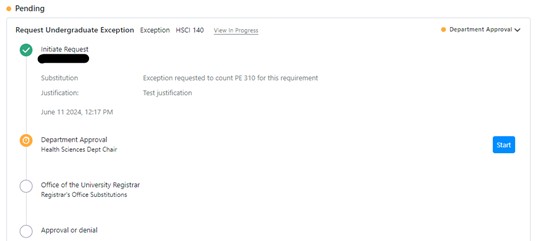
Here the chair can then approve or deny the request. If denying the request, a justification is required.
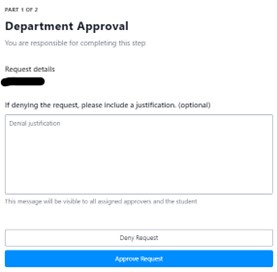
After the department chair approves, the request will be submitted to the Office of the University Registrar for final approval. Once the request is fully approved, it will display on the student’s progress tab with the updated exception.

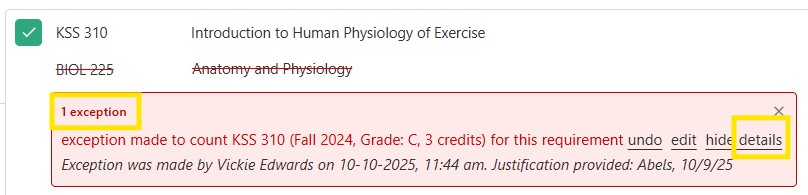
To review exception justifications, click on the red exception button and click the details link.
Department Chair Note: If you are a department chair and requesting an exception for a student that you advise you will have to first submit the exception as an advisor. Then you will need approve the exception request as the department chair.
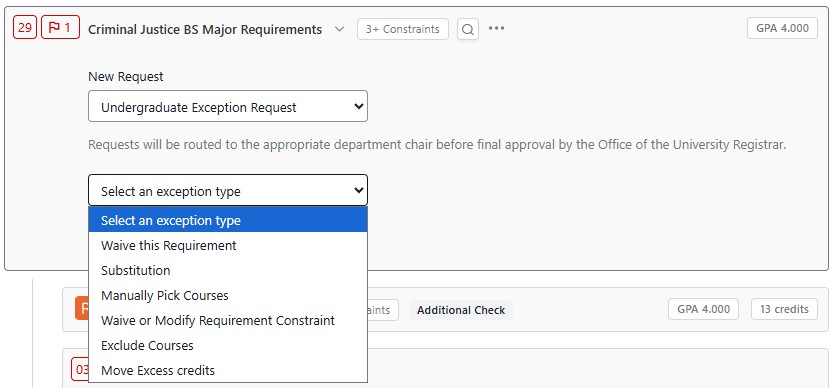
For non-course exceptions such as substitutions to program/requirement GPA (if the required major GPA is above 2.0), minimum grade requirements, maximum number of courses allowed, etc. you will need to find the constraint where this requirement is listed.
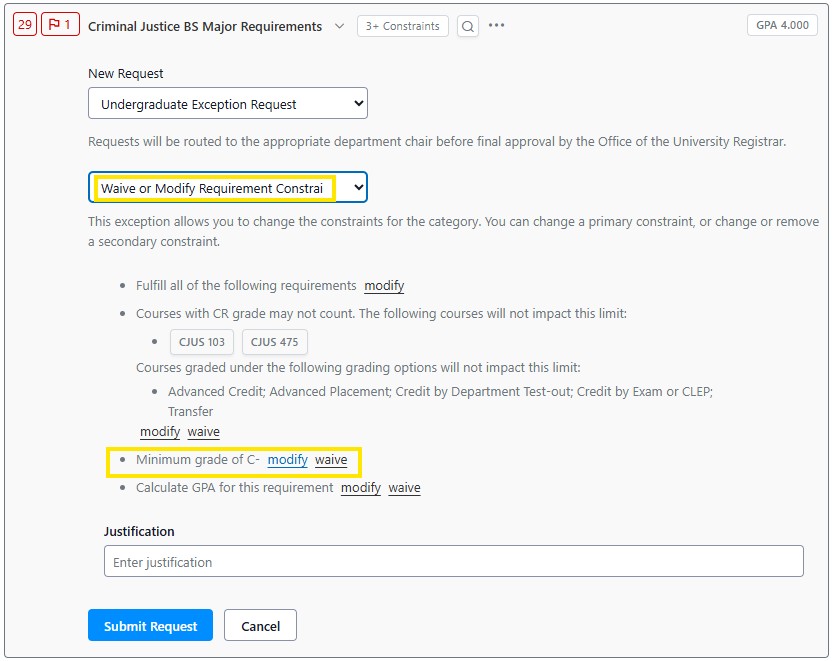
For example, Criminal Justice, BS has a minimum C- grade requirement under the major requirements (altering this would change the grade requirement for all courses in the program).
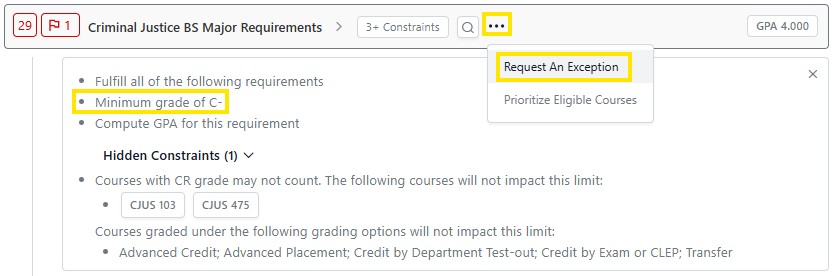
When requesting an exception on a requirement instead of a course, there are a few additional options. For this example, we will select Waive or Modify Requirement Constraint.
If you wanted to change the C- grade requirement for all classes in this section, you could modify it to a different grade or waive it so any passing grade would satisfy the requirements.
Note: To allow only one specific class to not meet the grade requirement, see above.
When requesting an exception to a general education course required by the major, the student must have already completed that LOPER requirement (or the course being requested must meet that LOPER requirement) for the exception to be approved.
Example: The student’s major requires BIOL 103 for LOPER 8. An exception is submitted for an elective transfer course to fulfill BIOL 103, but the student has not completed a LOPER 8-qualifying course. The exception would be denied and should be resubmitted once the student has completed LOPER 8.
Example: The student’s major requires ART 100 for LOPER 5. An exception is submitted for ART 375 to fulfill this requirement. ART 375 also fulfills LOPER 5, so this exception would be approved.
Example: The student’s major requires PSY 203 for LOPER 7. An exception is submitted for PSY 231 to meet this requirement. PSY 231 does not satisfy LOPER 7, but the student has already completed SOC 100 which does. The exception would be approved.
Exception requests for general education courses not required by the major (including LOPER 1) should be emailed to the General Education Director.
Course Duplications: If you are requesting a course substitution because of a duplication issue, to identify available courses that could be applied as a substitute, navigate to the 120 Overall Hours Required section heading in the student's Progress tab. Click on the heading to see all of the courses taken and in progress. Any courses that do not have the double check mark icon  could be potentially applied as a course substitute upon department chair approval. Hovering over that icon will also allow you to see what requirements that course is being applied to. Please visit the Course Overlap/Duplication page for more in depth guidance on overlap/duplication rules.
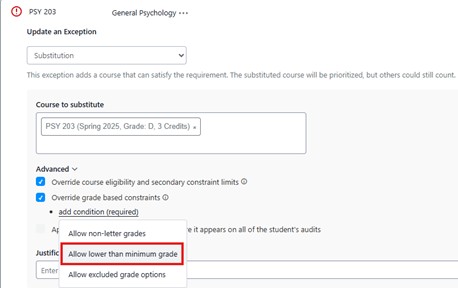
Minimum Grade Requirements: Some programs require courses to be passed with a certain grade (e.g. grade of C or higher). To request an exception for a lower than minimum grade to count, request the class be substituted for itself, click Advanced, check “Override grade based constraints,” and choose “Allow lower than minimum grade” from the dropdown menu.
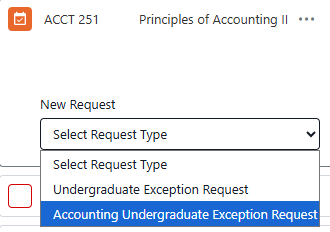
Business Administration Comprehensive: Students will have a different exception request process. For substitutions in the Business Administration Comprehensive major, you’ll need to select the appropriate emphasis workflow.
For example if requesting a substitution for the Business Administration Comprehensive – Accounting program, you would select the “Accounting Undergraduate Exception Request” workflow. If they have a minor or second major that you’re making a request for, use the standard “Undergraduate Exception Request” workflow.
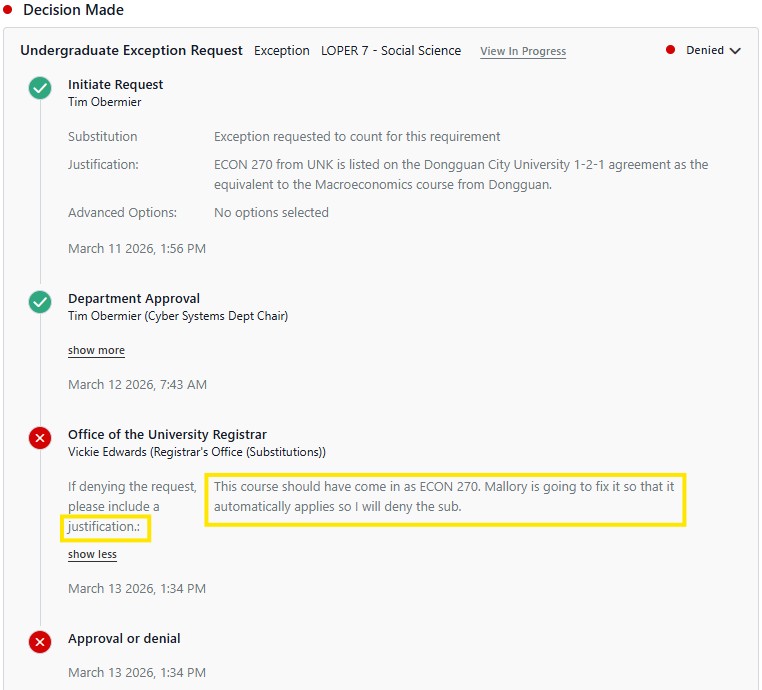
Denied Exception Requests: If requests for exceptions are denied, either from the department chair or the University Registrar, to view the justification navigate to the requests tab in the student’s profile. In the requests, prior approved exceptions will be listed as well as denials.
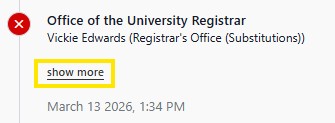
Click on the “show more” link to view the justification for the denied exception. The decision is timestamped as well as the person submitted the decision is provided.

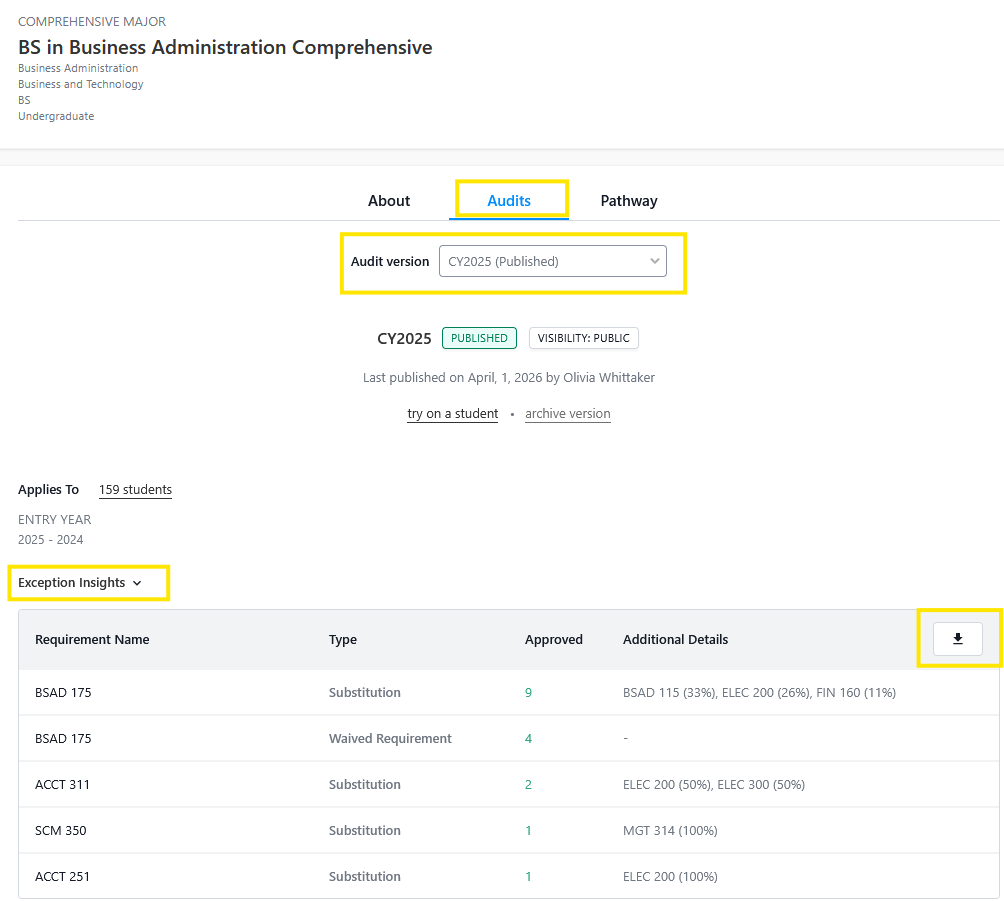
Exception Insights: To review the data of previously completed exceptions for a program, this can be done by searching a program and selecting a specific catalog year, in the audit tab then click on the "Exception Insights" link. A dropdown table will appear that includes the requirement name, exception type, number of approved, and additional details. This data can be helpful for departments seeking historical trends on exceptions.
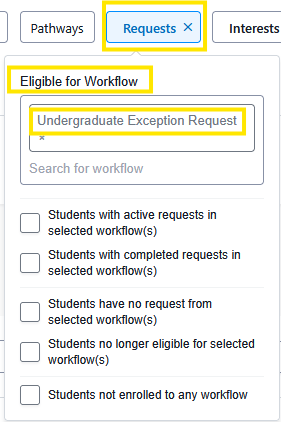
Requests Search Filter: Search for students with active or completed exception requests.
Requests Filter
Combine the Requests filter and the Advisor filter to review the status of exceptions of their advisees
Reminder, this can also be saved as report.
Students must complete a Degree Plan that consists of the following:
One major (30-36 hours) and one minor (18-24 hours). Duplication of coursework between the two is limited to eight (8) credit hours.
One major (30-36 hours) and a second major (30-36 hours). Duplication of coursework between the two is limited to eight (8) credit hours.
Students with multiple majors must select this
Each additional major beyond the first two is limited to eight (8) hours of duplication when compared to all courses in the Degree Plan.
For more in depth guidance please review the Course Overlap/Duplication information page.
Download the Stellic Exceptions & Substitutions Overview PDF document that captures the training information from above.





