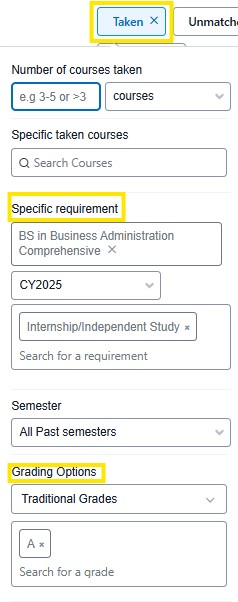
The Taken filter allows advisors to identify students by the courses or credits that have been applied towards their program requirements.
The search criteria within the Taken filter include:
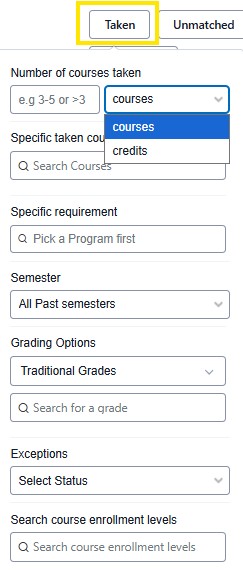
Number of Courses/Credits taken: A specific number or range (3-5 or >10) can be entered. Advisors can base a search number of courses or credits.
Specific taken courses: Search a specific course by name, course code & number. Multiple courses can be added to a search. The results will include students who have completed and or are currently taking the course.
Specific requirement: Search for students who have completed a specific requirement. First, type in a program, Select catalog year, then select specific requirements.
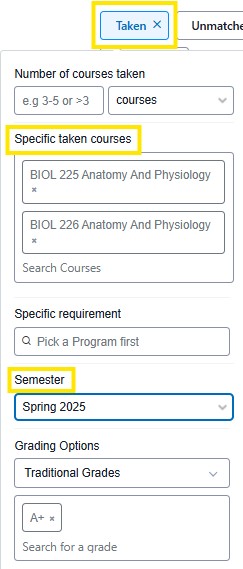
Semester: Sections range from Spring 2021-current semester.
Grading Options: When a course or requirement has been selected, advisors can select grading options, and completed grade. Grading options include, traditional grades, credit/no credit, CLEP and many more.
Exceptions: This option allows advisors to view students who have had exceptions made, pending or approved. Common exceptions include course substitutions, courses/credits waived. When combined with the program or specific requirement search, results will return with the list of students who have received an exception. Exceptions follow a workflow within Stellic. An exception is submitted by advisors, approved by department chairs, then approved and accepted by the University Registrar.
Search course enrollment levels: Undergraduate, Graduate
These search combinations are useful in identifying groups of students:
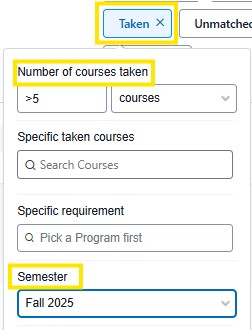
Number of credits/courses + Semester: This combination returns students who have taken a specific number of credits or courses in a specific semester.
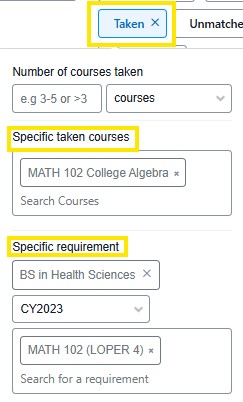
Specific taken courses + Specific requirement: This combination returns students who have completed a specific course to fulfill a degree requirement.
Specific taken courses + Semester: This combination returns students who took a specific course in a specific semester.
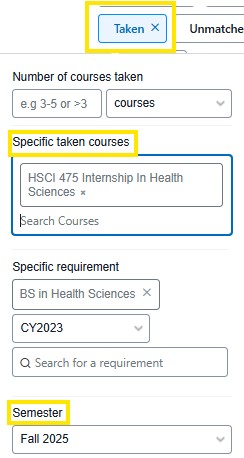
Specific taken course/s + Grade: This combination returns students who completed a specific course with a specific grade. Grading options include a wide range of grade options.
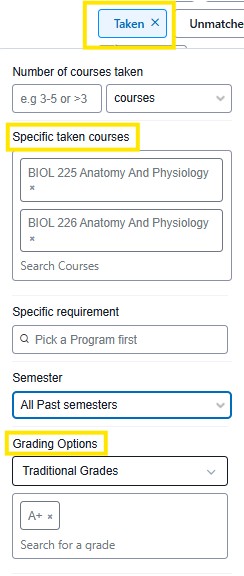
Specific taken courses + Grade + Semester: This combination returns students who completed a specific course with a specific grade by a specific semester.
Specific requirement + Grade: This combination returns students who earned a specific grade by the specific requirement.