

The Requests filter allows advisors to search for students that have any active or completed requests for approval. An example being, if an advisor has requested an exception for a course substitution, the request can be searched via the request filter.
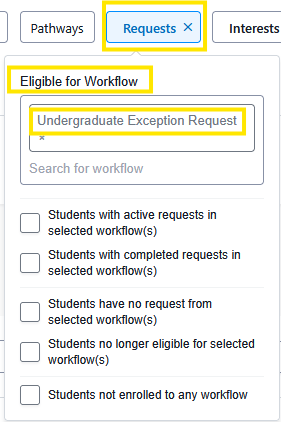
Advisors can identify students by their status within a selected workflow(s). Workflows refer to an approval process from request to review, to approval.
Eligible for Workflow: This allows you to find students who are eligible for that workflow. Start by typing in the first few letters of the workflow you are selecting. Most commonly used workflow for undergraduate students is Undergraduate Exception Request.
Tip: If an advisor initiated a request(s) to quickly narrow down the search, combine the request filter with the advisor filter. This way requests made by advisors can be viewed.





