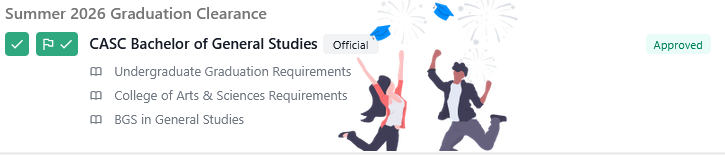
There are several clearance statuses to help students and advisors understand where they are in the graduation process. The Graduation clearance information is displayed on the student profile.
Learn more about Graduation, if you have any Graduation questions please contact graduationinfo@unk.edu
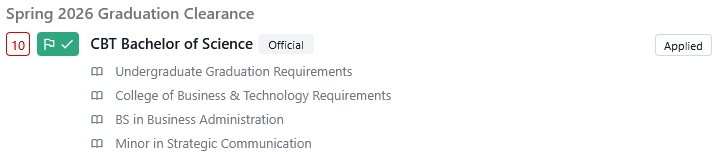
Applied: After a student submits their graduation application in MyBlue and has been processed by the Registrar’s office
In Review: The Graduation Coordinator is reviewing an application, verifying that in-progress coursework will lead to the completion of a student’s program.
Conditionally Approved: When a student has all their in-progress qualifications met. Includes in-progress coursework and communication of pending transfer work.
Approved: When a student has completed all their required program and undergraduate requirements. Typically, after LPGs or final grades have been posted, a student’s status will change to this level.
Awarded: When the student’s degree has been posted to their transcript and awarded in MyBlue.
Cancelled: If a student no longer meets requirements or wants to be removed from graduation and will need to reapply for a future semester.
Denied: When a student has been removed from graduation due to ineligibility.
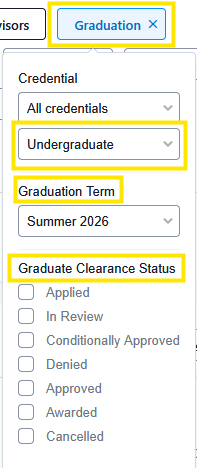
Advisors can search for their students and graduation status by using the Graduation search filter.
Credential
Graduation Term
Clearance Status, not selecting a status will return all students that have any status.
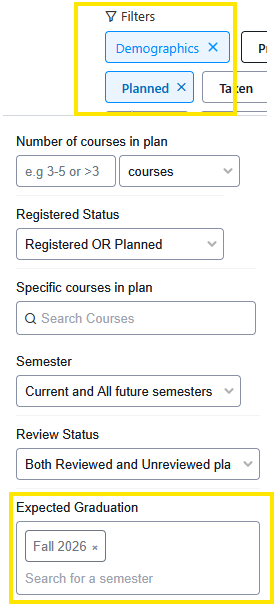
Expected Graduation, search for students that are expected to graduate by using the Planned Filter →Expected Graduation→specific semester.
To further narrow down your search and separate undergraduate and graduate students; use the demographics filter→Enrollment level→Undergraduate or Graduate.
Applied
In Review

Conditionally Approved

Approved