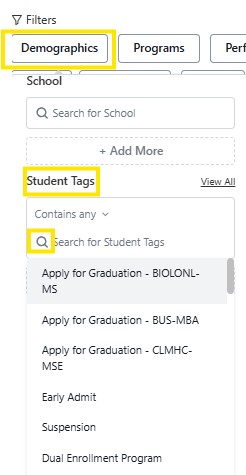
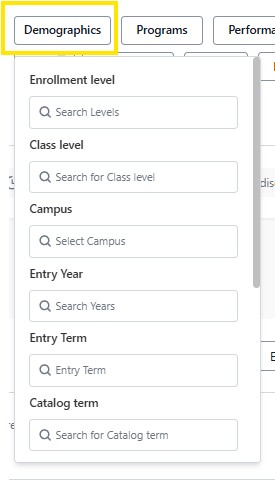
The Demographics filter identifies students based on their academic enrollment information. The available criteria used to identify students are:
Enrollment Level: Student academic career; Undergraduate, Graduate
Class Level: Student classification at the beginning of the term
Campus: Kearney
Entry Year: Fall semester of the entry year. Enter year or browse and select.
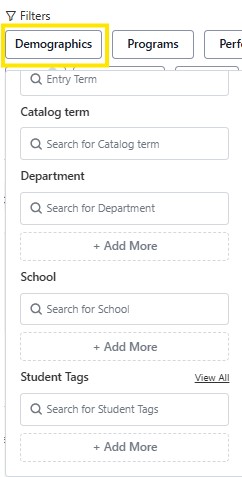
Entry Term: The term/semester a student began their academic career at UNK. Ex. Fall 2026
Catalog Term: The catalog year the student's program requirements are based off of.
Department: Academic department in which a student's program is housed; major, minor, certificates.
School: The college in which the student's program is housed.
Student Tags: Terms used to identify student groups. Displays on students profile.
Additional Search Criteria: When selecting criteria in the demographic filter, the option to add search parameters are available. "Contains any", results will include who meet any one of the search criteria. "Contains all" results includes students who meet all of the selected criteria. "Does not contain any" an opposite approach to search students that do not include any of the selected criteria. "Does not contain all" student included who do not meet the chosen criteria. 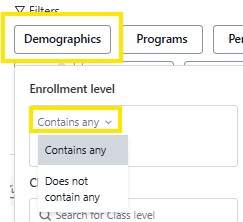
Tip: When entering in search criteria, pre-populated terms will appear as you type in your search criteria. Also if you are unsure of search terms available, click on the magnifying glass where available, and a list of terms will appear.